The built-in journaling system — what it records, tagging, and reviewing your sessions.
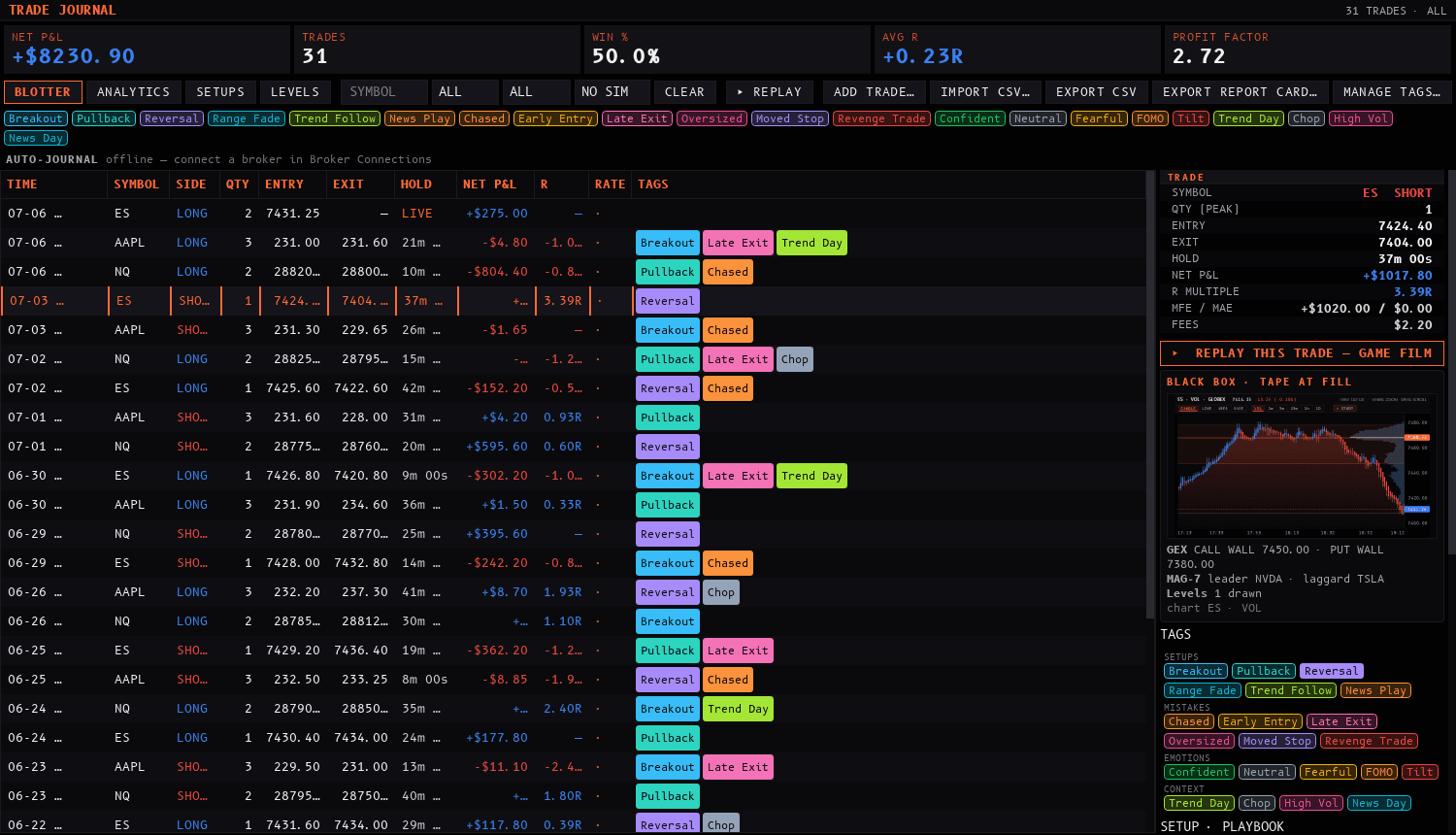
“The journal board records your trades with their context and your notes, so a session can be reviewed.”
The Trade Journal is built into the desktop terminal and journals your trading automatically. Every fill you generate inside the terminal — paper or live — flows into the journal, where fills are paired into complete round-trip trades: flat, into a position, back to flat. You never type in an entry price, an exit price, or a P&L number. The mechanical facts are captured for you; your job is the judgment — tags, a rating, and notes.
The journal has its own top-level Journal menu in the menu bar:
Journal Board | The main journal panel — summary tiles, filters, the trade blotter, the entry editor, and the analytics view. |
Today's Review | Opens the Journal Board snapped to today's trades and puts the cursor straight into the day note — the end-of-session shortcut. |
Playbook Tree | The visual playbook editor — encode your setups as a decision tree (see below). |
Order Log | The raw order-by-order event log — the unprocessed stream behind the round trips, if you ever want to see individual order events. |
You can also open it from the command palette: press Ctrl+P and run View: Toggle Journal Board. The journal is a normal dockable panel — drag it to any monitor, and it's restored with your workspace layout.
Every fill produced inside the terminal routes through one journal choke point, so nothing slips past it:
PAPER account.LIVE account.MANUAL) and CSV imports (IMPORT) — see below.Fills are paired into round trips per account and symbol: going from flat to a position opens a trade, returning to flat closes it. Scale-ins and scale-outs become additional fills on the open trade, and a crossing fill (long 2, sell 5) closes the long and opens a short with the remainder. Each round trip carries:
Entry / exit | Every fill with its timestamp, plus volume-weighted average entry and exit prices and your peak position size. |
Net P&L | Gross P&L, fees, and net — computed with the correct contract multiplier per symbol, so a two-point winner on an index future books at the contract's real dollar value, not the raw point value. |
R-multiple | If you traded with a bracket, the stop distance at entry defines your initial risk, and the trade's R-multiple is computed from it. Trades without a stop honestly have no R — the journal never fabricates one. |
MFE / MAE | Maximum favorable and adverse excursion, captured live, tick by tick, while the trade is open — plus the time it took to reach each. |
Hold time | Open and close timestamps; open trades show a live-ticking hold. |
Slippage | The intended price at submit is stored per fill, so slippage is preserved per execution. |
The board is one panel, top to bottom:
TODAY (the default) the tiles are your day summary.BLOTTER / ANALYTICS view switcher, a symbol box, side (ALL / LONG / SHORT), a date range (TODAY / 7D / 30D / ALL), a clickable wall of tag chips (multi-select), and CLEAR. Selecting tag chips also shows a per-tag quick-stats line — win rate and net P&L per selected tag. Everything recomputes instantly as you change filters.DAY NOTE for that trade's session date.Trades taken outside the terminal can still live in the journal. Two buttons in the filter bar:
ADD TRADE… | Hand-enter one round trip: symbol, side, quantity, entry price and time, an optional exit (or check “still open” to leave it running in the blotter), fees, and an optional stop/target so the trade gets a real R. The dialog previews net P&L, risk, and R live as you type. Manual trades book under the MANUAL account. |
IMPORT CSV… | A generic mapping importer for fill exports: pick a file, preview the first rows, map the columns (time / symbol / side / qty / price / fee), and pick a date format — or let it auto-detect, including unix timestamps. It handles quoted fields and comma, semicolon, or tab delimiters, and shows a dry-run summary (“N fills parsed → M round trips”) before anything is written. Imports book under the IMPORT account and every imported trade gets an “Imported” context tag, so they stay filterable forever. |
EXPORT CSV | Exports the currently filtered trades to a CSV file. Your journal is your data — it goes out as easily as it comes in. |
Click ANALYTICS in the filter bar to flip the board from the blotter to the analytics dashboard. The same filter — symbol, side, range, tag chips — drives both views. Four boards:
The analytics are deliberately honest: every board is computed over closed trades only (an equity curve steps on realized P&L, never on a live open position), and trades without a stop are reported as a "no R" count rather than being folded into a fabricated bucket.
A practical end-of-day loop:
Journal ▸ Today's Review — the range snaps to today and the day-note editor takes focus.DAY NOTE — one note per session date, your narrative of the day.7D or 30D, flip to ANALYTICS, and let the edge tables and per-tag curves tell you what to do more of — and what to stop doing.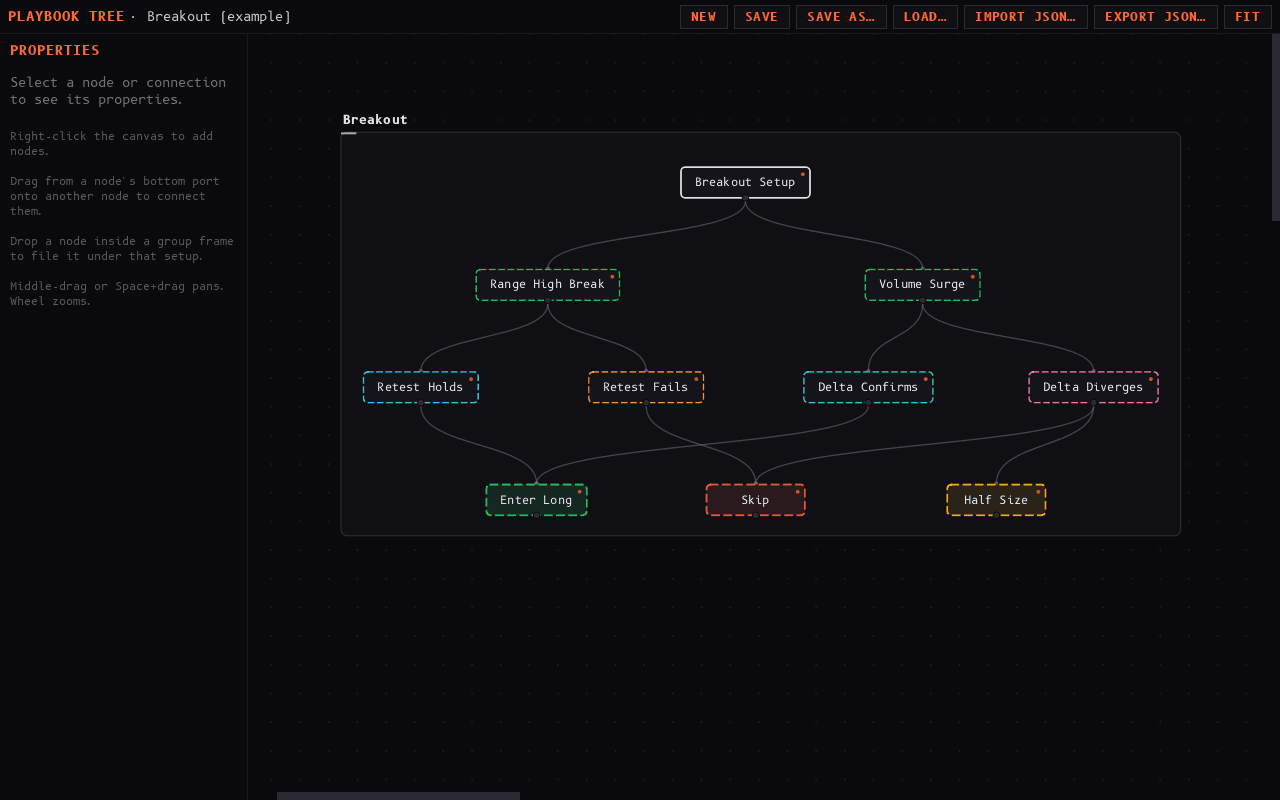
Journal ▸ Playbook Tree opens a visual editor for your trading playbook: a node graph where group frames hold your setup categories, decision nodes branch into condition and outcome nodes, and the connections encode the if-this-then-that of how you actually trade. Nodes take their accent colors from the same 12-swatch journal palette.
Playbooks save as named versions in the same local journal database, and you can export and import them as JSON files. A seeded example tree loads on first open so you start from a working reference, not a blank canvas.
The journal persists to a local database file in your user profile's application-data folder, on your machine. Trades, tags, notes, ratings, and playbooks survive restarts and live entirely locally — the journal subsystem makes no network calls and nothing journal-related is uploaded to Sharpnel's servers.
EXPORT CSV / IMPORT CSV… to move trades across.